
HOW IT WORKS / START SMALL
A little order. A lot less looking.
You do not have to catalog your whole life at once. Start with one collection and one place you would like to understand better.
01 / CHOOSE YOUR SPACE
Start with one part of your world.
Use a workspace for a collection such as a home inventory, a move or a set of project supplies. Give it a clear name so you can recognize the context whenever you return.
The examples here all come from one workspace: Moving Demo.
PICK A STARTING POINT
One shelf is enough
Choose a place or project that will be useful to find again.
MAKE IT FAMILIAR
Name the real locations
Use names for rooms, boxes, cabinets or bags that you already recognize.
KEEP IT USEFUL
Add the details that help
A name and location are a useful start. Add quantities, tags and properties as needed.
02 / GIVE THINGS A HOME
Put the digital record where the real thing belongs.
Create a container for the place, then put its items inside it. In Moving Demo, a kitchen-essentials tote brings its contents together in one table.
Open a container to see its contents, including each item’s quantity, location and tags.
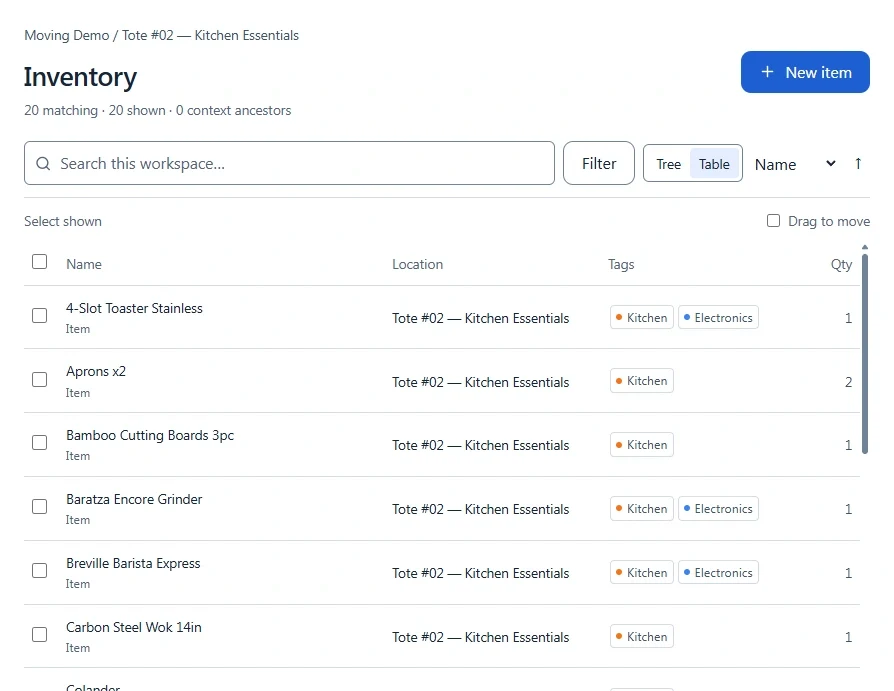
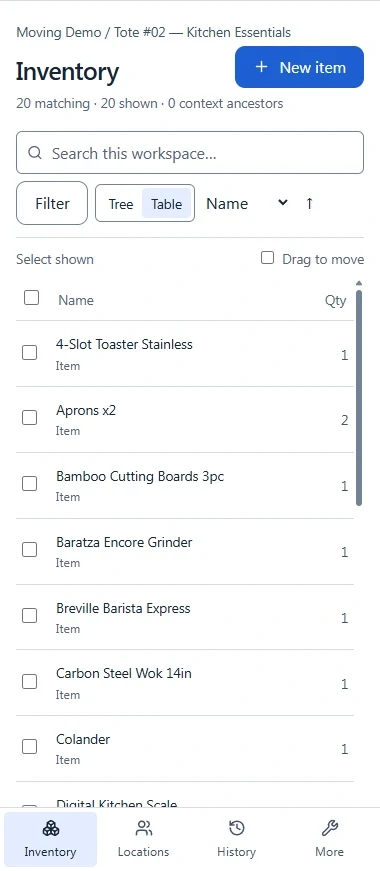
Actual NovaSort Lite container contents · Moving Demo / Tote #02 — Kitchen Essentials
03 / FIND YOUR WAY BACK
Search when you know the name. Browse when you know the place.
Use search and tags to narrow the collection, browse through its locations, and open an item when you need the full context.
A LITTLE LESS “WHERE DID I PUT IT?”
Bring a little order to your everyday.
Explore NovaSort Lite, or talk to us about the things you want to organize.